
This is an old revision of the document!
Table of Contents
Recipies
Quick recipies for different tasks
Credentials and More
Recipies for handling credentials and authentication things
Import OTP QRCode into KeePassXC
- Copy the exported qr code to your client.
- Extract the otp string with zbarimg
zbarimg /path/to/qrcode.png
QR-Code:otpauth-migration://offline?data=XXXX
scanned 1 barcode symbols from 1 images in 0.12 seconds
- Convert the code with otpauth
otpauth -link "otpauth-migration://offline?data=XXXX"
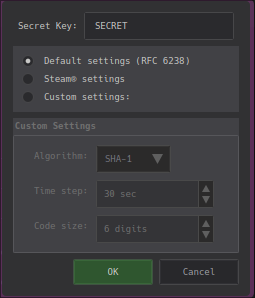
otpauth://totp/USER@XXX?algorithm=SHA1&digits=6&issuer=ISSUER&period=30&secret=SECRET
- Import the OTP in KeePassXC

Hide & Seek
All stuff about searching everywhre and everything ;)
Git I'll find you :P
Full-history regex scan (mirror clone)
Below is a ready-to-run shell helper that clones a repo as a mirror (so all refs/tags are included) and executes regex searches across all commits / blobs.
Save as scan_public_repo_regex.sh, make executable and run.
REPO_URL=“${1:-}” PATTERN=“${2:-}” EXCLUDE=“${3:-}”
if | -z "$PATTERN" ; then
cat «USAGE
Usage: $0 “” [“”]
Example:
$0 https://github.com/owner/repo.git '(?i)\b(user|username)\b\s*[:=]\s*[“,']?([^\s,”,']+)' '(?i)username'
USAGE
exit 2
fi
TMP=“$(mktemp -d)” trap 'rm -rf “$TMP”' EXIT cd “$TMP”
echo “[*] Cloning mirror of '$REPO_URL' into $TMP/repo.git (this may take a while)…” git clone –mirror “$REPO_URL” repo.git >/dev/null 2>&1 cd repo.git
REVLIST=“$(git rev-list –all)” if -z "$REVLIST"; then echo “[!] no refs found” exit 1 fi
echo “[] Running git grep across all commits (pattern):” echo “ $PATTERN” if -n "$EXCLUDE"; then echo “[] Exclude pattern:” echo “ $EXCLUDE” fi echo
Try PCRE first (git grep -P). If -P not available, fallback to -G and external filtering.
set +e git –version > /dev/null 2>&1
Run search per commit set (git grep supports listing multiple commits)
Use –text to scan binaryish files as text and –no-color for clean output
if git grep -P -n –text –heading –break -e “$PATTERN” $REVLIST >/dev/null 2>&1; then
PCRE supported
if -n "$EXCLUDE"; then git grep -P -n –text –heading –break -e “$PATTERN” $REVLIST | grep -P -v –line-number –color=never “$EXCLUDE” || true else git grep -P -n –text –heading –break -e “$PATTERN” $REVLIST || true fi else echo “[*] git grep -P not available or failed, falling back to POSIX regex and grep filter.”
Fallback: git grep -G then filter with grep -P if available or grep -E
if -n "$EXCLUDE"; then git grep -n –text –heading –break -G -e “$PATTERN” $REVLIST | ( grep -P -v –color=never “$EXCLUDE” 2>/dev/null || grep -E -v “$EXCLUDE” || true ) else git grep -n –text –heading –break -G -e “$PATTERN” $REVLIST || true fi fi set -e
echo echo “[*] Also scanning commit messages (git log –grep)…” if -n "$EXCLUDE"; then
commit messages: find matches and exclude commits containing exclude pattern
git log –all –pretty=fuller –grep=“$PATTERN” -i | awk '/^commit /{c=$2} /'“$PATTERN”'/i{print c; print; print “—-”}' | xargs -I{} bash -c 'git show –pretty=fuller {} || true' | ( grep -P -v –color=never “$EXCLUDE” 2>/dev/null || grep -E -v “$EXCLUDE” || cat ) else git log –all –pretty=fuller –grep=“$PATTERN” -i || true fi
echo echo “[*] Done. Temp dir: $TMP (auto-removed on exit).”
Quick usage examples
Literal / case-insensitive search for EXACT_STRING (YOUR-EXACT-STRING):
./scan_public_repo_regex.sh https://github.com/owner/repo.git '(?i)YOUR-EXACT-STRING'
Regex search: find keys like user: username or user = username (case-insensitive):
'(?i)\b(user|username)\b\s*[:=]\s*[“']?([^\s,”']+)'
Search for password variants (password, passwd, pwd) next to a value:
'(?i)\b(pass(word)?|passwd|pwd)\b\s*[:=]\s*[“']?([^\s,”']{4,})'
Combined: look for any auth/token/key-like identifiers:
'(?i)\b(api[-]?key|apikey|secret|token|auth|access[-]?token|bearer|private[-]?key|ssh[-]?key)\b\s*[:=]\s*[“']?([A-Za-z0-9-._]+)'
Your “SEARCH FOR but EXCLUDE exact username/password” (negative lookahead, PCRE):
'(?i)\buser\b\s*[:=]\s*(?!username\b)([^\s,]+)' '(?i)\bpass(word)?\b\s*[:=]\s*(?!secret\b)([^\s,]+)'
This finds user: <value> where the value is not username, and pass: <value> where the value is not secret.
Notes on the examples & intuition
Why so many variants? Humans store credentials in many ways. Use these families:
Key names: user, username, uid, owner · pass, passwd, password, pwd · secret, api_key, apikey, api-key · token, auth, access_token, bearer · key, private_key, ssh_key, rsa_key · client_id, client_secret
Separators: key: value · key = value · key ⇒ value · “key”: “value”
Value patterns: Base64-like [A-Za-z0-9+/=]{20,} (noisy), long alphanumerics with -_.
Practical approach:
Start literal with YOUR-EXACT-STRING (fast, exact).
Expand to key families: password|passwd|pwd|secret|token|api[_-]?key.
Add context anchors: check left key names or separators.
Need to ignore a known safe value → negative lookahead (?!value) or post-filter grep -v.
Too much noise → restrict file types (*.env, *.yaml, *.json, *.tf, *.ini).
Regex cheat-sheet (PCRE, case-insensitive)
Simple literal (case-insensitive)
(?i)YOUR-EXACT-STRING
Keys + value (JSON/YAML/INI friendly)
(?i)\b(user|username|uid)\b\s*[:=]\s*[”']?([^\s,“']+) (?i)\b(pass(word)?|passwd|pwd)\b\s*[:=]\s*[”']?([^\s,“']{4,})
Auth/token/key family
(?i)\b(api[-]?key|apikey|secret|token|auth|access[-]?token|bearer|private[-]?key|ssh[-]?key)\b\s*[:=]\s*[”']?([A-Za-z0-9-._]{8,})
Base64-ish blobs (suspicious but noisy)
[A-Za-z0-9+/]{40,}={0,2}
URL with embedded basic auth (user:pass@host)
(?i)https?:[^/\s:@]+:[^@\s]+@[^/\s]+ “SEARCH FOR but EXCLUDE” (negative lookahead) (?i)\buser\b\s*[:=]\s*(?!username\b)([^\s,]+) (?i)\bpass\b\s*[:=]\s*(?!secret\b)([^\s,]+) ==== Practical tips ==== Use literal -F for your exact known string first — zero false positives. To exclude a test token: post-filter with grep -v or use PCRE negative lookahead. If your git grep lacks -P, fallback with git grep -G then pipe into grep -P or perl. Limit file types to reduce noise: git grep -P -n -I –heading –break -e '(?i)password' $(git rev-list –all) – '.py' '.yaml' '.env' '.json' || true Inspect matches precisely: git show <commit-sha>:<path/to/file> ==== Example workflows ==== Exact-string quick check (literal): ./scan_public_repo_regex.sh https://github.com/owner/repo.git '(?i)YOUR-EXACT-STRING' Password-like keys but ignore known placeholder secret: ./scan_public_repo_regex.sh https://github.com/owner/repo.git '(?i)\b(pass(word)?|passwd|pwd)\b\s*[:=]\s*[“']?([^\s,”']{4,})' 'secret' Any API keys/tokens: ./scan_public_repo_regex.sh https://github.com/owner/repo.git '(?i)\b(api[-]?key|apikey|secret|token|auth)\b\s*[:=]\s*[“']?([A-Za-z0-9-.]{8,})' ==== Safety / assurance notes ==== This script only reads repo objects; it does not modify the remote. If you find a secret in the public repo, rotate/revoke immediately; rewrite history afterwards. PCRE-first: the script attempts -P and falls back if unavailable. * CONTENT HIER * ===== OS Tricks ===== Operating system specific recipies ==== Win11 offline installation ==== - During setup when asked for connecting to a network press SHIFT+F10 to open a cmd - In the opened cmd type <code>oobe\BypassNRO</code> - After reboot you can procceed the installation and skip the network configuration


